Product
NI Chord-Detector
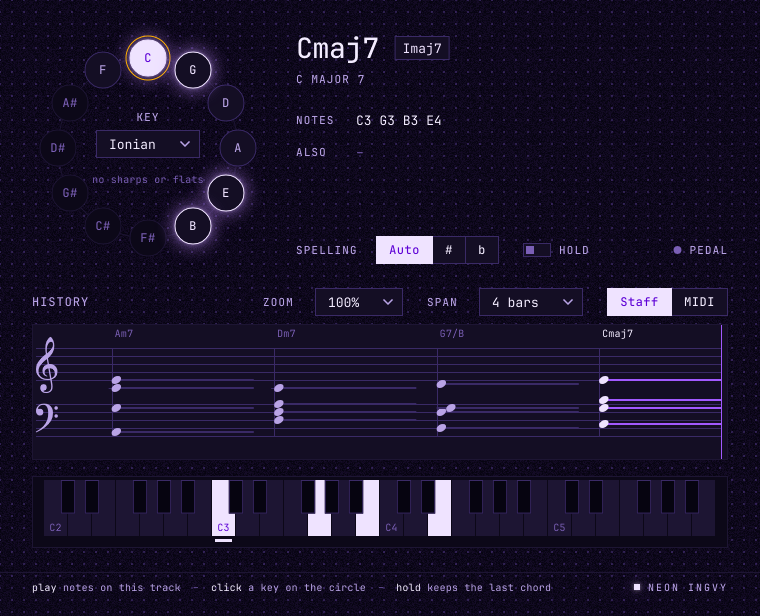
Put it on a MIDI track and play. It tells you what you are playing: the chord by name, its roman numeral in your key, the notes, and the other names the same notes go by. A circle of fifths, a keyboard and a scrolling history light up as you play.
It makes no sound. It is an instrument only because that is how Live hands a plugin the notes of a MIDI lane.

What it names
Everything sounding at once is read as one thing: every key held down, and every key the sustain pedal is holding. All MIDI channels count as one.
| You play | It shows |
|---|---|
| one note | the note with its octave, C4 |
| the same note in octaves | the note, C in 3 octaves |
| two notes | the interval, C–E · major 3rd; a fifth is a power chord, C5 |
| three or more | the chord, Am7, read from the lowest note |
| three or more with no common name | the notes, C Db D |
The bass decides. The same four notes, C E G A, are C6 with C at the bottom
and A minor 7 with A at the bottom. A chord whose lowest note is not its root is
written with a slash: C/E is C major with E in the bass, its first
inversion. The other readings of the same notes are listed under Also.
Sixteen notes at most are read, the lowest sixteen. The keyboard and the history still show every note.
The key
Click a key on the circle of fifths, or step around it a fifth at a time with the arrow keys, and pick a mode in its centre: Ionian (major), Dorian, Phrygian, Lydian, Mixolydian, Aeolian (natural minor) or Locrian. From the keyboard, Enter opens the mode menu and chooses in it. Space always starts and stops Live’s transport, also when the plugin window has focus.
The key does two things:
- Roman numerals. Each chord gets its degree in the key:
ii7,V7,Imaj7. A chord built on a note outside the key is marked with a flat or a sharp: B flat major in C major isbVII, F sharp half-diminished is#ivø7. - Spelling. With Spelling on Auto, notes are named the way a score
in the key writes them:
Bbin C major,E#in F sharp major,G#in A minor. # and b name every black key one way instead.
On the circle, the seven notes of the key are tinted, the notes sounding are lit, the chord’s root is filled, and the key you chose wears an amber ring.
Hold
A chord released key by key passes through every smaller chord on its way to silence. With Hold on, the chord you played stays named while its keys come up, and after the last one it stays on screen, dimmed and marked HELD, until you play something new.
The history
The last bars scroll from right to left, with now at the right edge, in your song’s bars.
- Staff shows them as notes on a grand staff with the key signature: a note head where each note began and a line for as long as it sounded. Chord names sit above the staff where each chord began. It does not write rhythm — no quarter notes, no rests — because naming a rhythm is a guess and this is a record.
- MIDI shows one line per note, numbered at each C, and a bar for each note.
Span sets how many bars it shows: 1, 2, 4 or 8. While the transport is stopped the history keeps scrolling at the last tempo, so you can play to it.
The window
Zoom makes it 75, 100, 125 or 150 percent of its size. The window keeps its proportions and nothing in it moves.
Parameters
| Name | Choices | Automatable |
|---|---|---|
| Key | C to B | yes |
| Mode | Ionian … Locrian | yes |
| Spelling | Auto, Sharps, Flats | yes |
| Hold | Off, On | yes |
| History | Staff, MIDI | no |
| Span | 1, 2, 4, 8 bars | no |
| Zoom | 75 %, 100 %, 125 %, 150 % | no |
All seven are saved with your set. The last three only change the window, so Live is not offered them for automation.
How it is built
The engine is Rust (engines/chord-detector): which notes sound, what they are
called and the history’s clock. The names come from
music-core, the repository’s
music theory library. The plugin around it is a JUCE 9 VST3 for macOS (Linux
and Windows follow), its window built from the native Ultraviolet kit. Nothing on the audio thread allocates, and a panic
(All Notes Off) clears everything at once.
See NI Chord-Detector in Ableton Live for setting it up.
| Hosts | Ableton Live — VST3 Not on the Move |
|---|---|
| Engine | engines/chord-detector |
| Crates | cd-corecd-capimusic-core |
| Tests | cd_core_rscd_coremusic_core_rsmusic_core_no_stdjuce_host_NIChordDetectorcodesign_NIChordDetector |
A macOS bundle that is not notarised will not load until its quarantine attribute is cleared — the release notes say whether it is and carry the command, and so does the installation section below.
Ableton Live Interface
Where to put it
NI Chord-Detector is an instrument, because Live gives a plugin the notes of a MIDI track only when it is an instrument. It makes no sound, so it goes where it can hear the notes without taking the place of the synth that plays them.
In an Instrument Rack, beside your synth. This is the usual way.
- Group your synth into an Instrument Rack: select it and press ⌘G (Ctrl+G on Windows).
- Open the rack’s chain list and drag NI Chord-Detector into the empty space under the synth’s chain. It becomes a second chain.
- Play. Both chains get every note: the synth sounds, NI Chord-Detector names.
On its own track. To watch a track without touching it:
- Make a new MIDI track and put NI Chord-Detector on it.
- Set its MIDI From to the track you want to watch, and its monitoring to In.
A first chord
- Play C, E and G together. The readout says C, with I beside it, C MAJOR underneath and C3 E3 G3 as the notes. On the circle C, E and G light up, C filled as the root.
- Add A above G, so you hold C E G A with C at the bottom. The readout says C6, and under Also it lists Am7/C: the same four notes, read from A. Now play them with A at the bottom: Am7. The lowest note decides.
- Play E G C, E lowest: C/E, C major · 1st inversion.
Reading in a key
Your song is in D Dorian. Click D on the circle and choose Dorian in its centre. The circle’s signature says no sharps or flats — D Dorian uses the white keys — and the seven tinted discs are its notes.
Now play C major: it reads VII, the seventh chord of the mode. Play B flat major: bVI, a chord borrowed from outside the key, and named Bb, not A#, because a score in D Dorian would write it that way.
Hold and the pedal
Turn Hold on, play a chord and let go one key at a time. The name stays the chord you played, and when the last key is up it stays on screen, dimmed, with HELD lit. The next note you play replaces it.
The sustain pedal counts as holding: notes you release while it is down keep sounding, and keep being named, until it comes up. The PEDAL light shows it is down.
Watching the history
The history scrolls with your song’s bars. Switch between Staff and MIDI at its top right, and choose how many bars with Span.
On the staff, a note outside the key signature carries its accidental, and a natural cancels the signature where the key would raise or lower a note. Chord names appear above the staff where each chord began.
When it shows nothing
- Nothing at all: NI Chord-Detector is on an audio track, or the track is not monitoring. It needs MIDI: put it on a MIDI track, in an Instrument Rack, or set MIDI From as above.
- It stops naming after Stop: Live’s Stop sends All Notes Off, and every held note — and a held chord — is cleared. That is the panic working.
Installing and updating
-
Quit Live completely — Live keeps every plugin it has loaded in memory until it quits, so a bundle replaced while it runs is not the one you see.
-
Download
chord-detector-<version>-macOS.zipfrom the release (universal: Apple silicon and Intel) and copyNIChordDetector.vst3from it into~/Library/Audio/Plug-Ins/VST3, replacing the one there. -
A bundle that is not notarised is refused until its quarantine attribute is removed:
xattr -dr com.apple.quarantine ~/Library/Audio/Plug-Ins/VST3/NIChordDetector.vst3 -
Start Live, open Settings → Plug-Ins, turn on Use VST3 Plug-In System Folders if it is off, and press Rescan. NI Chord-Detector appears in the browser as an instrument under Neon Ingvy.
NI Chord-Detector is a VST3, for macOS; Linux and Windows follow in a later release.
The licence notices travel with the plugin: the bundle carries LICENSE,
THIRD_PARTY_LICENSES.md, the font’s OFL.txt and the texts of the licences
of what it is built with (AGPL-3.0.txt, Apache-2.0.txt) in
Contents/Resources/.
Schwung Interface
Not on the Move. Not yet: the engine is ready for a Move module (it allocates nothing and depends on nothing a module could not carry), but a Schwung version is not part of this release.